


Best RV Internet Providers
Comparing RV Internet Providers and Connectivity Models
RV internet is rarely a single-product decision.
A weekend traveler may be satisfied with a phone hotspot. A full-time remote worker may need two cellular connections, an external antenna and satellite backup. An RV manufacturer or rental operator may need embedded connectivity that can be provisioned, monitored and supported across hundreds or thousands of vehicles.
Those requirements should not be evaluated as though they are the same.
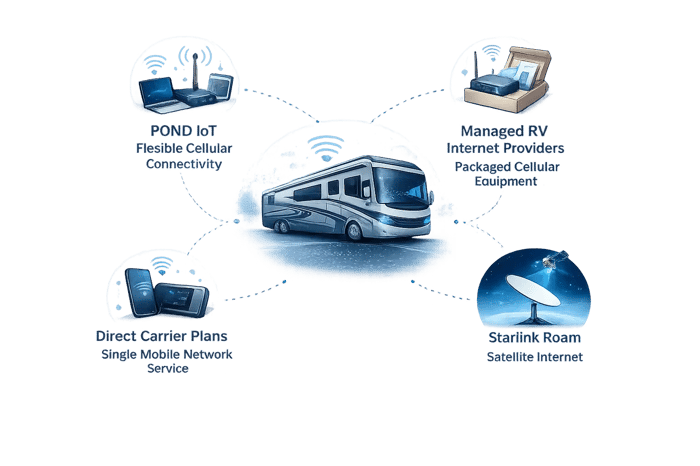
For this guide, the RV connectivity market is divided into four practical models:
- POND IoT: Flexible, multicarrier cellular connectivity for RV manufacturers, rental fleets, mobile businesses and technically advanced deployments that need control over hardware, networking and carrier access.
- Managed RV internet providers: Packaged hardware and service for travelers who value simplicity over extensive customization.
- Starlink Roam: Satellite internet for locations where usable terrestrial cellular service is unavailable or insufficient.
- Direct carrier plans: Straightforward service from AT&T, T-Mobile or Verizon for travelers whose coverage and data requirements fit one carrier.
The right choice depends less on which company has the most familiar brand and more on how the RV is used, where it travels, what equipment is installed and what happens when the primary connection stops working.
Quick Answer: Which RV Connectivity Model Fits Best?
Consider POND IoT when:
- Connectivity is being deployed across an RV product line, rental fleet or mobile workforce.
- The RV already uses a compatible Peplink, Cradlepoint, Teltonika or other cellular router.
- The deployment should not be locked into a proprietary consumer hotspot.
- Access to multiple carrier networks is important.
- Connectivity needs to work across domestic or international markets.
- The operator needs APIs, centralized SIM administration or provisioning automation.
- Private APNs, VPNs, static IPs or controlled remote access are required.
- Cellular connectivity supports more than passenger internet, such as telematics, security, diagnostics, asset tracking or remote equipment management.
- A technical team wants greater control over network behavior and hardware selection.
POND publicly positions its service around multicarrier connectivity, global network access and managed IoT infrastructure. Its current materials describe coverage across more than 200 countries and hundreds of cellular networks, although the exact networks available to a specific deployment depend on the SIM profile, hardware, country and commercial agreement.
Consider a managed RV internet provider when:
- The buyer wants a router or hotspot bundled with a data plan.
- Minimal configuration is preferred.
- The provider is expected to assist with equipment selection and setup.
- Connectivity is primarily for personal internet access.
- Hardware and service standardization matter more than advanced network control.
TravlFi, for example, currently markets portable hotspots and fixed RV routers with multnetwork service, while MobileMustHave specializes in mobile-internet equipment, Peplink bundles, antennas and configuration support.
Consider Starlink when:
- The RV regularly stays beyond usable cellular coverage.
- The campsite has a sufficiently open view of the sky.
- High data consumption is expected.
- The user can accommodate the equipment, mounting and power requirements.
- Satellite connectivity will be used independently or as part of a cellular-plus-satellite architecture.
Starlink currently markets its Roam plans specifically for RVs, nomads, campers and mobile work. Depending on the plan, current offerings include portable use, pause or standby options, and supported in-motion use under stated conditions. Plan availability, data allowances and international-use rules can change by market and should be checked before purchase.
Consider a direct carrier plan when:
- The RV travels mainly within one carrier’s strong coverage area.
- The connection is for occasional or moderate use.
- A phone hotspot or basic standalone hotspot is sufficient.
- The buyer does not need advanced routing, centralized management or multi-WAN failover.
- Simplicity and existing customer discounts outweigh carrier flexibility.
RV Internet Providers and Connectivity Models at a Glance
POND IoT, managed RV internet providers, Starlink Roam and direct carrier plans address different RV connectivity requirements.
POND is oriented toward flexible multicarrier cellular connectivity, hardware independence and connected-RV deployments that require APIs, private networking or centralized management. Managed RV internet providers emphasize packaged equipment, simplified setup and consumer-focused support. Starlink is strongest in remote locations with limited cellular coverage and a clear view of the sky, while direct carrier plans are best suited to travelers with predictable coverage and relatively simple internet needs.
The most appropriate model depends on how the RV is used, where it travels, what hardware is already installed and how much downtime the user or operator can tolerate.
| Connectivity Model | Primary RV Connectivity Differentiator | Best-Suited Requirement |
|---|---|---|
| POND IoT | Customizable multicarrier cellular connectivity, customer-directed network selection, hardware flexibility, APIs, centralized SIM administration, private networking, static IP options and secure remote access | RV manufacturers, rental fleets, connected-coach platforms, specialty vehicles, mobile businesses and technically managed deployments that want connectivity designed around existing routers, embedded hardware, vehicle systems and domestic or international operating requirements |
| Managed RV Internet Providers | Packaged hotspots or routers, bundled data service, equipment guidance, simplified setup and consumer-oriented support | Individual RV owners who want a ready-to-use internet solution with less responsibility for router selection, SIM administration, configuration and day-to-day troubleshooting |
| Starlink Roam | Satellite internet that does not depend on nearby cellular towers and can provide higher-capacity connectivity in remote locations with a sufficiently clear view of the sky | Boondockers, remote workers and travelers who regularly stay beyond practical cellular coverage and can accommodate the equipment, power, mounting and sky-visibility requirements |
| Direct Carrier Plans | Straightforward cellular service from a single mobile-network operator, often through a phone hotspot, portable hotspot or compatible router | Weekend travelers and regionally concentrated users whose destinations align well with one carrier and who do not require advanced routing, multicarrier flexibility or centralized connectivity management |
How This Guide Was Built
This guide evaluates the public capabilities and operating models that materially affect an RV deployment:
- Cellular and satellite availability
- Multicarrier access
- Hardware flexibility
- Bundled versus unbundled service
- Router and antenna compatibility
- Domestic and international use
- Mobility and in-motion operation
- Failover and multi-WAN support
- APIs and centralized administration
- Private networking
- Static IP addressing
- Secure remote access
- Data usage
- Installation requirements
- Support responsibilities
- Suitability for individual users, manufacturers and fleets
It does not rank providers by promotional pricing, crowdsourced speed tests, anecdotal support experiences or a single national coverage map.
Those comparisons are unreliable because RV performance changes by location, season, carrier congestion, antenna installation, plan priority, hardware and even the exact campsite.
Editorial Disclosure
This guide is published by POND IoT, which is included in the comparison.
Its purpose is not to claim that one service is universally best. It is to explain which connectivity model is most closely aligned with different RV requirements.
Individual consumers should also confirm that a provider’s commercial terms, support model and account requirements are appropriate for personal use. Some connectivity services are designed primarily for businesses, OEMs or managed deployments rather than direct-to-consumer subscriptions.
The Most Important RV Internet Distinction
Wi-Fi Is Not the Internet Connection
RV owners often use “Wi-Fi” and “internet” as though they mean the same thing.
They do not.
Wi-Fi is the local wireless connection between a phone, laptop, television or appliance and a nearby router. That router still needs an upstream internet source.
The upstream connection might be:
- A cellular network
- Starlink or another satellite service
- Campground Wi-Fi
- Wired internet at a seasonal site
- A phone hotspot
- More than one of these sources combined
A device may show a full Wi-Fi signal while the actual internet connection behind the router is slow or completely unavailable.
That is why adding a stronger indoor Wi-Fi access point does not fix carrier congestion, satellite obstruction or an exhausted data plan.
Why RV Internet Fails in the Real World
An RV creates a difficult networking environment.
It moves between towers, terrain, climates and regulatory markets. It may be parked under trees one week and in an exposed desert the next. The network may need to serve one traveler checking email or an entire family streaming video while another person joins a conference call.
Common failure modes include:
- Weak cellular coverage
- Carrier congestion
- Data deprioritization
- Plan throttling
- A satellite dish obstructed by trees
- Poor antenna placement
- Incorrect router bands or carrier compatibility
- Damaged roof cables
- Water intrusion
- Loose antenna connections
- Excessive cable loss
- Router overheating
- Low or unstable DC voltage
- Incorrect APN settings
- SIM provisioning problems
- Firmware issues
- International roaming restrictions
- A router that stays attached to a weak network instead of selecting a better one
- Failure of the router, modem or local Wi-Fi system
- Excessive cloud backup, streaming or software-update traffic
The provider name alone does not resolve those problems.
A reliable RV network is an architecture: service plans, modems, antennas, mounting, power, routing policies and recovery behavior working together.
Five Mistakes RV Buyers Commonly Make
Mistake 1: Choosing One Carrier From a National Coverage Map
Coverage maps are useful for broad planning. They do not predict the experience at a specific campsite.
Two parks several miles apart may behave differently because:
- Different tower sectors serve them.
- A hill or valley blocks one carrier.
- One tower is congested.
- The RV is parked behind a metal structure.
- The selected modem lacks an important band.
- Antenna placement differs.
- Hundreds of travelers arrive for the same event.
The biggest coverage map is not always the most useful network at the place where the RV is actually parked.
For travelers who move frequently, the ability to use or select among several networks can be more valuable than loyalty to one carrier.
Mistake 2: Assuming More Signal Bars Mean Better Internet
Signal strength is only one part of performance.
A router can show strong signal while throughput remains poor because the tower is congested or the plan is being deprioritized. Conversely, a moderate signal on a lightly loaded band may provide better performance.
Useful diagnosis considers:
- Signal strength
- Signal quality
- The connected frequency band
- Carrier aggregation
- Tower load
- Latency
- Packet loss
- Data-plan treatment
- Modem capability
Bars are a simplified indicator, not a complete network test.
Mistake 3: Treating Starlink and Cellular as Direct Substitutes
The two technologies often fail under opposite conditions.
Satellite can perform well in remote open areas where cellular towers are absent. It may struggle when trees, terrain or structures obstruct the sky.
Cellular can work well under tree cover and while the vehicle is moving, provided usable terrestrial coverage exists. It may fail in remote valleys or areas far from an appropriate tower.
For travelers whose work or safety depends on connectivity, the stronger design is often not cellular or satellite. It is cellular and satellite, with a router that can choose or fail over between them.
Peplink, for example, currently markets multi-WAN and SpeedFusion technologies that can combine or fail over among cellular, satellite and wired connections.
Mistake 4: Buying an Expensive Antenna Before Diagnosing the Problem
An external antenna can materially improve an installation, especially when the RV body weakens signal or the router supports multiple cellular antenna paths.
But an antenna will not solve:
- Tower congestion
- Data throttling
- A suspended SIM
- Incorrect router configuration
- Satellite obstruction
- An incompatible modem
- Poor local Wi-Fi design
The antenna should match the modem, frequency bands, cable run, mounting location and travel pattern.
An omnidirectional roof antenna is convenient for a moving vehicle because it does not need to be aimed. A directional antenna can be useful when parked for an extended period and targeting a distant tower, but it introduces additional setup and alignment.
Mistake 5: Believing “Unlimited” Means Every Activity Is Unrestricted
The word “unlimited” does not by itself describe:
- Network priority
- Video-resolution policies
- Hotspot restrictions
- Roaming limits
- High-speed data allowances
- Traffic-management thresholds
- Acceptable-use requirements
- Whether the plan can be installed in a router
Buyers should read the plan terms and ask how data is treated after heavy use.
For remote work, a predictable connection with clear policies may be more valuable than a plan marketed only around the word “unlimited.”
The Main RV Internet Architectures
1. Phone Hotspot
A phone hotspot is the simplest RV internet setup.
It works best for:
- Occasional trips
- Email and light browsing
- One or two devices
- Travelers already satisfied with their mobile carrier
Its limitations become more obvious when:
- The phone leaves the RV.
- Several devices need service.
- The phone overheats.
- External antenna support is needed.
- The cellular plan limits hotspot data.
- A stable always-on network is required.
A phone hotspot is a useful backup even when the RV has a dedicated router.
2. Standalone Mobile Hotspot
A portable hotspot separates the internet connection from the user’s phone.
It can support several devices and be moved between the RV, tow vehicle and other locations.
This model remains relatively simple, but portable hotspots may offer fewer Ethernet ports, antenna options, routing controls and failover capabilities than a dedicated mobile router.
3. Single-Modem Cellular Router
A dedicated cellular router creates a permanent network inside the RV.
It can connect:
- Laptops
- Televisions
- Cameras
- Smart-home equipment
- Navigation devices
- Tablets
- Workstations
- Vehicle systems
A router can remain powered and connected even when no traveler’s phone is present.
The main limitation is that a single modem generally uses one cellular connection at a time. The router may accept several SIM profiles, but that does not necessarily mean it can actively use two carriers simultaneously.
4. Dual-Modem or Multi-WAN Router
A dual-modem router can maintain two cellular connections or combine cellular with other WAN sources, depending on the model and configuration.
This can support:
- Priority-based failover
- Load distribution
- Session persistence
- Traffic steering
- Carrier diversity
- Cellular-plus-Starlink operation
Peplink currently offers mobile routers and related multi-WAN technology designed for primary and backup connectivity in mobile environments. Specific modem counts, bonding features and licenses vary by product.
5. Cellular Router With External Roof Antenna
This is a common architecture for serious travelers and connected RV deployments.
The router remains inside the vehicle while the antenna is mounted where the RV body is less likely to attenuate the signal.
The installation must account for:
- Number of modem antenna ports
- MIMO configuration
- Cable length and loss
- Roof penetrations
- Weather sealing
- Antenna separation
- GPS and Wi-Fi elements
- Serviceability
- Future modem upgrades
A poorly installed premium antenna can perform worse than a modest antenna with a shorter, properly terminated cable run.
6. Cellular Plus Starlink
This is one of the most adaptable RV architectures.
The router can use:
- Cellular where tower service is strong
- Starlink where cellular is weak
- Campground Wi-Fi when it is genuinely usable
- Failover policies when one source becomes unavailable
The exact behavior depends on the router.
Basic systems switch from one WAN to another. More advanced systems can steer different applications across different links or use bonding technology.
7. Embedded OEM or Fleet Connectivity
RV manufacturers and rental operators have requirements that individual travelers may never see.
Connectivity may support:
- Vehicle diagnostics
- Battery and power-system monitoring
- HVAC status
- Water-system alerts
- GPS and asset recovery
- Security systems
- Remote lock control
- Predictive maintenance
- Customer onboarding
- Digital owner applications
- Warranty support
- Over-the-air software updates
- Rental turnover and fleet operations
In these deployments, the passenger Wi-Fi connection may be only one part of the system.
The buyer must consider device identity, provisioning, APIs, private networking, international operation, ownership transfer and what happens when the vehicle is resold.
POND IoT
Flexible Cellular Connectivity for Connected RVs and Mobile Operations
POND is most relevant when an RV deployment requires more than a packaged consumer hotspot.
Its model is better aligned with organizations that want connectivity designed around the vehicle, router, platform and operating workflow.
Potential deployment types include:
- RV manufacturers
- Connected-coach platforms
- Rental fleets
- Dealership groups
- Mobile offices
- Specialty vehicles
- Production vehicles
- Emergency and response units
- Mobile medical or service vehicles
- Premium RV installations
- Technically managed full-time-travel systems
Connectivity Independent From the Hardware Platform
RV connectivity can become difficult to change when the SIM, router, cloud application and service plan are tightly bundled.
A hardware-independent approach can allow an organization to:
- Retain compatible existing routers
- Select equipment for different RV models
- Change router vendors over time
- Use embedded modems where appropriate
- Support several hardware generations
- Separate vehicle connectivity from the infotainment platform
- Avoid replacing an otherwise functional network when the service relationship changes
POND’s public positioning emphasizes multicarrier connectivity and support for distributed devices rather than one proprietary RV appliance.
Hardware support should still be validated by exact modem, carrier certification, frequency bands, firmware and intended geography.
Multicarrier and Multinetwork Access
No single carrier provides the strongest experience at every RV park, highway, rural worksite and international destination.
POND can provide access to multiple cellular networks, subject to the connectivity profile and deployment agreement. Its public materials also describe global operation across more than 200 countries.
This is most valuable when paired with appropriate network-selection logic.
A multicarrier SIM does not guarantee that a router will always choose the fastest network. Selection can depend on:
- The networks authorized by the SIM
- The modem and firmware
- Available radio technologies
- Network priority
- Steering policies
- Registration history
- Manual or automated selection controls
POND’s technical content correctly notes that network selection depends heavily on the networks a SIM is authorized to use.
The practical question is not merely:
How many carriers appear in the brochure?
It is:
Which networks can this exact router use here, and what control do we have when its first choice is not performing well?
Existing Router Support
POND can be evaluated for use with compatible enterprise and industrial routers instead of requiring every customer to purchase one branded consumer device.
Depending on certification and configuration, potential platforms may include hardware from:
- Peplink
- Ericsson Cradlepoint
- Teltonika Networks
- Semtech or Sierra Wireless
- Other cellular router and embedded-modem manufacturers
Compatibility should never be inferred from the brand name alone. Buyers should verify:
- Exact model number
- Modem variant
- LTE and 5G bands
- SIM format
- APN support
- Carrier certifications
- Firmware
- Region
- Antenna requirements
APIs and Lifecycle Management
An RV manufacturer or fleet operator may need connectivity to fit into its own systems.
Possible workflows include:
- Activating connectivity during production
- Suspending service while a vehicle is stored
- Assigning a plan at delivery
- Transferring an account to a new owner
- Grouping vehicles by model, region or fleet
- Monitoring usage
- Generating alerts
- Integrating SIM status into a support portal
- Managing rental inventory
- Changing service policies over time
That is where APIs and centralized connectivity administration become more important than a consumer-facing mobile application.
Private Networking and Static IP Options
Some connected-RV systems need controlled access to a router, gateway or vehicle subsystem.
Standard cellular connections are often placed behind carrier-grade NAT, which can prevent direct inbound access.
POND publicly offers static public and static private IP options. It also positions static addressing as one tool for remote access and network management, not as a complete security system.
Depending on the architecture, a deployment may use:
- Private APNs
- VPN tunnels
- Static private IPs
- Static public IPs
- Outbound management tunnels
- Firewall allowlists
- Centralized remote-access platforms
A public static IP should not be exposed without authentication, firewalling, patching and access controls.
Domestic and International Operation
Cross-border travel introduces issues beyond coverage.
The operator should verify:
- Countries in which the service is authorized
- Available partner networks
- Permanent-roaming rules
- Data routing
- Latency
- APN behavior
- Local carrier restrictions
- Hardware bands
- Plan pricing
- Support coverage
- Whether service can remain active for an extended stay
A service described as “global” does not mean every network or feature is identical in every country.
Where POND Fits Best
POND is most closely aligned with RV deployments where:
- The buyer wants control over the cellular architecture.
- Existing compatible routers should be retained.
- Multiple networks or countries must be supported.
- Connectivity needs to serve operational systems as well as passenger internet.
- APIs and lifecycle management are required.
- Private networking or static addressing is needed.
- The deployment should remain independent from one proprietary RV hotspot.
- Technical flexibility is more important than a simple retail bundle.
Managed RV Internet Providers
Packaged Connectivity for Travelers Who Prefer Simplicity
Managed RV providers combine some or all of the following:
- A hotspot or router
- Cellular service
- Setup guidance
- Antenna options
- Installation resources
- Customer support
- Plan administration
This model is easier for many individual travelers because it reduces the number of technical decisions they need to make.
TravlFi
TravlFi currently offers portable 4G and 5G hotspots as well as plug-in routers. Its public materials emphasize multnetwork connectivity and RV-focused plans.
TravlFi is most relevant to travelers who want:
- Consumer-oriented purchasing
- A provider-selected device
- Simplified plan administration
- A portable or fixed RV option
- Less responsibility for selecting individual carrier plans
Buyers should still verify:
- How network selection works
- Whether it is automatic or user-directed
- Available high-speed data
- Traffic-management policies
- Hardware ownership
- Antenna compatibility
- International availability
- Whether service works while moving
- What happens if the device or plan is discontinued
MobileMustHave
MobileMustHave operates more like an equipment specialist and solution integrator than a single connectivity network.
Its current catalog and support materials emphasize Peplink routers, mobile-internet bundles, antennas, installation resources and technical guidance.
It is most relevant to buyers who want:
- Assistance selecting a Peplink router
- Bundled mobile-internet equipment
- Roof-antenna guidance
- Installation resources
- A more advanced consumer or prosumer system
- Support configuring multi-WAN hardware
This can be a strong path for an individual traveler who wants capable equipment without independently sourcing every component.
The Main Managed-Service Trade-Off
The more responsibility a provider assumes, the less control the customer may retain.
That is not inherently negative.
For an individual RVer, simpler support and one bundled purchase may be preferable to managing APNs, SIM profiles, modem certifications and routing policies.
The buyer should understand:
- Which components are portable to another provider
- Whether the router is locked
- Who owns the equipment
- Which networks are available
- Whether the plan can be moved to another router
- What monitoring is included
- What the provider can actually diagnose
- What happens when the RV is sold
Starlink Roam
Satellite Connectivity for Locations Beyond Practical Cellular Coverage
Starlink changed the RV market by making portable satellite broadband considerably more accessible.
Its current Roam materials are explicitly directed toward RVs, campers, nomads and working on the go. Current plan details vary by market, and Starlink publishes specific rules for data allowances, portability, international travel and in-motion operation.
Where Starlink Is Strongest
Starlink is most compelling when:
- No usable cellular tower serves the area.
- The RV is parked in open terrain.
- Large downloads or high-volume usage are expected.
- The user stays in one location long enough to set up the equipment.
- Satellite will supplement rather than completely replace other connections.
Where Starlink Can Struggle
The connection requires a suitable view of the sky.
Performance can be disrupted by:
- Tree cover
- Canyon walls
- Buildings
- Terrain
- An unsuitable mounting position
- Power limitations
- Equipment movement or vibration
- Plan restrictions
- Congestion or service-policy changes
A campsite can have excellent cellular service and poor satellite visibility, or the opposite.
Portable Versus Fixed Mounting
A portable setup gives the owner freedom to place the terminal away from trees or the RV body.
The disadvantages are:
- Setup at each stop
- Additional cabling
- Theft exposure
- Storage requirements
- The possibility of leaving equipment behind
A fixed roof installation simplifies deployment but cannot be repositioned around an obstruction.
The better choice depends on how frequently the RV moves and where it parks.
In-Motion Use
Starlink currently states that certain Roam and priority plans support in-motion use under defined conditions and in authorized locations. Buyers should verify the current plan, terminal and geographic restrictions rather than assuming every Starlink configuration may be used while driving.
Starlink as Part of a Multi-WAN System
Starlink becomes more resilient when the RV router can treat it as one WAN source rather than the only internet connection.
A properly configured system might:
- Prefer cellular while driving.
- Use Starlink when parked in an open remote area.
- Keep a second cellular carrier as backup.
- Route video downloads over the connection with the most capacity.
- Keep a work call on the lowest-latency link.
- Fail over when obstruction interrupts the satellite connection.
The router—not the satellite terminal—determines much of that policy.
Direct Carrier Plans
Simple Service From One Mobile Network
A direct AT&T, T-Mobile or Verizon plan may be entirely adequate for a weekend traveler.
It is familiar, widely available and often easy to add to an existing mobile account.
Where a Single Carrier Works Well
A direct plan is most appropriate when:
- Travel remains within a known region.
- The owner already knows which carrier performs well.
- Internet use is occasional.
- The RV does not need an always-on router.
- A phone or basic hotspot serves all devices.
- Advanced networking is unnecessary.
The Main Limitation
The RV is only as connected as that carrier at the current location.
When the vehicle moves outside the carrier’s strong coverage area—or the local tower becomes congested—the owner cannot resolve the problem without another service option.
This is why many serious travelers keep:
- A second carrier
- Starlink
- Campground Wi-Fi capability
- A secondary hotspot
- Some combination of these
Questions to Ask About a Direct Carrier Plan
Confirm:
- Whether hotspot or router use is permitted
- High-speed data allowance
- Deprioritization policy
- Video restrictions
- Canada and Mexico usage
- International roaming
- Device compatibility
- 5G support
- Whether the plan can be used in an externally purchased router
- What happens after the stated data threshold
Which Connectivity Model Fits Each Requirement?
| RV connectivity requirement | Connectivity model most closely aligned |
|---|---|
| Connectivity designed around existing cellular routers, embedded modems and connected-vehicle hardware | POND IoT |
| Access to multiple carrier networks for changing travel environments | POND IoT |
| Customer-directed network selection and configurable carrier policies | POND IoT |
| Existing-hardware flexibility across Peplink, Cradlepoint, Teltonika and other compatible routers | POND IoT |
| Connectivity independent from the infotainment, telematics or connected-coach platform | POND IoT |
| APIs, centralized SIM administration and automated vehicle provisioning workflows | POND IoT |
| Private APNs, VPNs, static IP options and secure remote access to vehicle systems | POND IoT |
| RV manufacturer, connected-coach or rental-fleet deployment | POND IoT |
| Domestic and international connectivity across multiple countries and carrier relationships | POND IoT |
| Connectivity for diagnostics, telematics, security, tracking and remote equipment management | POND IoT |
| Packaged RV internet with a router or hotspot, data plan and setup guidance | Managed RV Internet Provider |
| Preconfigured consumer hardware with minimal router and SIM administration | Managed RV Internet Provider |
| Guided equipment selection, antenna planning and installation support | Managed RV Internet Provider |
| Consumer-focused support for an individual RV owner | Managed RV Internet Provider |
| Internet in remote, open-sky locations beyond practical cellular coverage | Starlink Roam |
| High-volume streaming, large downloads or remote work while parked with clear sky | Starlink Roam |
| Satellite backup within a cellular-plus-satellite multi-WAN architecture | Starlink Roam with a compatible multi-WAN router |
| Occasional internet use in a predictable geographic region | Direct Carrier Plan |
| Basic phone-hotspot or standalone-hotspot connectivity | Direct Carrier Plan |
| Simple service from one mobile network where coverage is already known to be reliable | Direct Carrier Plan |
| Maximum resilience for full-time remote work or business-critical mobile connectivity | Cellular plus satellite with automated failover |
This table maps common RV internet and connected-vehicle requirements to the connectivity model most closely aligned with each need. It is not a ranking of overall coverage, speed, reliability, support quality or value. Actual capabilities may vary by plan, country, carrier, hardware, installation, network conditions, configuration and commercial agreement.
Choosing an Architecture by RV Use Case
Weekend and Vacation Travel
A phone hotspot or standalone carrier hotspot may be enough.
The traveler should consider adding another option only when repeated trips reveal a consistent limitation.
Buying a complex dual-modem router for a few weekends per year may add cost without meaningful benefit.
Full-Time RV Living
Full-time travelers experience more network variation and are more likely to rely on connectivity for essential tasks.
A stronger architecture may include:
- A dedicated mobile router
- External MIMO antenna
- Access to two cellular networks
- Starlink
- Campground Wi-Fi as an opportunistic input
- Automated failover
- Local network segmentation
The exact combination depends on travel geography and tolerance for downtime.
Remote Work
Remote work changes the standard.
A connection that is adequate for streaming may still be poor for real-time meetings, VPN sessions or cloud applications.
Remote workers should evaluate:
- Latency
- Packet loss
- Upstream capacity
- Failover time
- Session persistence
- VPN compatibility
- Data priority
- Power backup
- Whether a secondary connection is immediately available
The most important question is not the highest speed reached during one test.
It is whether the system can keep a work session usable as conditions change.
Boondocking
Boondockers often operate in locations with little infrastructure.
Starlink can be highly valuable where the sky is open, but cellular should not automatically be discarded. Some remote recreation areas have usable coverage from one carrier even when another has none.
Power consumption also matters.
The internet architecture should be evaluated alongside:
- Battery capacity
- Solar generation
- Inverter efficiency
- Generator use
- Time of day
- Whether the network must remain on overnight
National Parks and Forested Campgrounds
These environments expose the complementary strengths of satellite and cellular.
Dense trees may obstruct satellite service. Terrain and tower distance may weaken cellular service.
A traveler who depends on connectivity should research the specific destination and carry more than one path when practical.
No provider should guarantee service at every campsite.
Canada and Mexico Travel
Cross-border travelers should verify more than whether the provider displays a coverage map.
Confirm:
- How much high-speed data is included
- Whether use is treated as roaming
- Duration limits
- Supported partner networks
- Local regulatory restrictions
- Whether the router supports local bands
- Whether the service may remain active for an extended stay
- Whether the account must retain a home-country address
RV Rental Fleets
Rental operators need connectivity that can survive changing drivers and inconsistent user behavior.
Relevant capabilities include:
- Centralized activation and suspension
- Data-usage controls
- Vehicle-level visibility
- Theft and asset-recovery support
- Remote diagnostics
- Ownership of the router configuration
- Secure separation of operational traffic and guest Wi-Fi
- Reset procedures between renters
- Predictable support escalation
A consumer plan selected independently for each RV is unlikely to scale cleanly.
RV Manufacturers and Connected-Coach Platforms
OEM programs should decide early:
- Who owns the SIM relationship?
- Who pays for service before and after retail delivery?
- Can the customer select a plan?
- How is ownership transferred?
- What happens during dealer inventory?
- Which systems remain connected if the owner cancels passenger Wi-Fi?
- Can safety, diagnostics and entertainment traffic be separated?
- How long will the modem remain supportable?
- Can the connectivity platform support future countries and carriers?
- Can a new router generation be introduced without redesigning the entire service?
Those decisions are harder to change after vehicles are in the field.
Why Two RVs in the Same Campsite Can Perform Differently
Consider two RVs parked side by side.
The first uses:
- A phone hotspot inside a metal coach
- One carrier
- No external antenna
- A heavily deprioritized plan
- Several people streaming simultaneously
The second uses:
- A roof-mounted MIMO antenna
- A dedicated 5G router
- Access to more than one network
- Traffic-priority rules
- Starlink backup
- Separate work and entertainment networks
The location is identical.
The internet experience is not.
What Matters More Than Peak Speed
RV internet reviews often emphasize maximum download speed.
That number is easy to understand, but it is not always the most useful measurement.
For work and operational connectivity, evaluate:
- Latency: How quickly data makes a round trip.
- Packet loss: Whether information is being dropped.
- Jitter: How much latency varies.
- Upload performance: Important for meetings, cameras and cloud backup.
- Consistency: Whether performance remains usable throughout the day.
- Failover time: How long it takes the router to recover.
- Session survival: Whether applications disconnect during failover.
- Network priority: How traffic is treated when the tower is busy.
A stable 30 Mbps connection may be more useful than a connection that alternates between 150 Mbps and nearly zero.
How Much Data Does an RV Need?
There is no universal number because usage patterns vary significantly.
The largest drivers are usually:
- Video streaming
- Video conferencing
- Game and operating-system downloads
- Cloud photo and file backup
- Security cameras
- Remote desktop sessions
- Social-media video
- Multiple concurrent users
A household that works remotely and streams television daily can consume substantially more data than a traveler who checks email and downloads maps.
Before selecting a plan:
- Review current home and mobile usage.
- Identify which activities can be scheduled.
- Disable unnecessary automatic updates.
- Use local media where practical.
- Separate essential work traffic from entertainment.
- Set alerts before high-speed thresholds are reached.
- Confirm whether video traffic is managed differently.
Router and Hardware Considerations
Peplink
Peplink is widely used in advanced mobile deployments because its product range includes cellular mobile routers, multi-WAN capabilities, remote management and SpeedFusion technologies.
Peplink currently describes SpeedFusion as capable of combining multiple WAN sources, including cellular, satellite and wired connectivity, for bonding or failover. Exact functionality depends on the router, service license and configuration.
Peplink is most relevant when:
- Multiple WAN sources are required.
- Failover policies matter.
- A technically managed network is acceptable.
- Cellular and Starlink will be integrated.
- The deployment may grow over time.
Ericsson Cradlepoint
Cradlepoint hardware is more commonly associated with enterprise mobility, branch networking, fleets and managed business deployments.
It may be appropriate for:
- Commercial RV fleets
- Mobile offices
- Specialty vehicles
- Organizations already using Cradlepoint
- Deployments requiring enterprise administration
For a single recreational user, its enterprise model may be more than is necessary.
Teltonika Networks
Teltonika offers compact industrial cellular routers that can fit embedded and vehicle applications.
It may be appropriate when:
- The router supports operational equipment.
- Size and power consumption matter.
- Ethernet and industrial interfaces are required.
- An OEM or integrator controls the configuration.
Consumer Hotspots
Consumer hotspots prioritize portability and ease of use.
They remain appropriate for:
- Weekend travelers
- Backup connectivity
- Light use
- People who do not need roof antennas or advanced routing
The right device is the least complex one that reliably meets the requirement.
Technical Evaluation Checklist
Cellular Service
Confirm:
- Available carrier networks
- Supported countries
- 4G and 5G access
- Data priority
- High-speed allowances
- Video policies
- Roaming rules
- Plan suspension options
- Router use permissions
- SIM and eSIM support
- Network-selection controls
- APN requirements
Router
Confirm:
- Exact modem variant
- Supported LTE and 5G bands
- Number of cellular modems
- Number of SIM slots
- Simultaneous versus standby connections
- External antenna ports
- Ethernet ports
- Local Wi-Fi standard
- DC power requirements
- Operating temperature
- Cloud-management requirements
- Failover and bonding capabilities
- Firmware-support lifecycle
Antenna
Confirm:
- MIMO configuration
- Frequency coverage
- Cable length
- Cable loss
- Roof material
- Mounting location
- Weather sealing
- Clearance from other antennas
- Whether Wi-Fi and GPS elements are integrated
- Replacement and service access
Satellite
Confirm:
- Plan eligibility
- Terminal model
- In-motion support
- Geographic restrictions
- International-use limits
- Obstruction sensitivity
- Mounting method
- Power consumption
- Cable routing
- Whether the terminal will feed a separate router
Power
Confirm:
- AC versus DC operation
- Typical and peak consumption
- Battery-bank capacity
- Solar production
- Inverter losses
- Low-voltage shutdown behavior
- Whether the router restarts automatically
- Whether connectivity is required overnight
- Surge and power-conditioning requirements
Security
Confirm:
- Wi-Fi encryption
- Unique administrative credentials
- Firmware updates
- Guest-network isolation
- Separate operational and passenger traffic
- VPN requirements
- Private APN availability
- Static IP exposure
- Firewall rules
- Remote-management permissions
- Ownership transfer procedures
Failover
Confirm:
- Primary and secondary WAN order
- Health-check method
- Failure-detection interval
- Failover time
- Failback behavior
- Session persistence
- Data-cost rules
- Whether Starlink and cellular can be used simultaneously
- What happens when all WAN sources fail
Questions to Ask Every RV Connectivity Provider
- Is the service designed for consumers, businesses, OEMs or fleets?
- Which carrier networks are available?
- Can the customer control network selection?
- Will the service work in my existing router?
- Which exact modem variants are supported?
- Does the plan permit router use?
- What happens after the high-speed data allowance is reached?
- Is traffic deprioritized during congestion?
- Are there restrictions on video streaming?
- Can service be used in Canada and Mexico?
- How long can it remain outside the home country?
- Are static or private IP options available?
- Can the router or vehicle system be reached remotely?
- Does the provider support private APNs or VPNs?
- Can connectivity be activated through an API?
- Can accounts be transferred when an RV is sold?
- Who owns the router and configuration?
- What monitoring is included?
- Can the provider distinguish a SIM issue from a router or antenna problem?
- What is the escalation process when a carrier rejects registration?
- Can plans be paused during storage?
- Is in-motion use supported?
- What equipment must be replaced to change providers?
- How will the system behave if its preferred network is congested?
- What should remain connected if passenger internet is canceled?
Final Assessment
There is no single best internet provider for every RV.
The better question is:
What kind of RV connectivity system are we trying to operate?
POND IoT is the strongest fit for manufacturers, rental fleets, mobile organizations and technically managed deployments that require multicarrier access, hardware flexibility, global operation, APIs, private networking or remote access.
Managed RV internet providers are the strongest fit for individual travelers who want a router or hotspot, a data plan and support packaged together.
Starlink Roam is the strongest fit for remote open-sky locations where terrestrial cellular service is not adequate.
Direct carrier plans are the strongest fit for occasional travelers whose destinations align well with one mobile network.
For users who cannot tolerate downtime, the most resilient answer is usually not one provider.
It is an architecture that combines independent connectivity paths and makes the recovery process predictable.
Frequently Asked Questions
Full-time travelers often benefit from a dedicated cellular router, more than one carrier option and satellite backup.
The exact setup should reflect where they travel, how much data they use and how damaging an outage would be.
Neither technology is universally better.
Cellular often performs well in populated areas, under tree cover and while moving. Starlink is valuable in remote locations with open sky.
A combined system generally provides broader resilience than either one alone.
It can replace cellular in some locations, but not every environment.
Trees, terrain, mounting constraints, power use and plan requirements can make a cellular connection preferable in other situations.
Yes, with the appropriate service plans and hardware.
A router may switch between SIMs, maintain two active modems or use more advanced multi-WAN features. These are different capabilities, so buyers should confirm exactly how the selected router operates.
Not necessarily.
Network selection depends on the SIM profile, modem, available networks, radio conditions and selection policies. Access to several networks creates more options, but it does not make every performance decision automatically optimal.
Not always.
A capable LTE router may outperform a basic 5G device in a location with stronger LTE coverage or better antenna installation.
Choose the modem based on coverage, bands, longevity, expected traffic and budget—not the 5G label alone.
It can be, particularly when the router is inside a metal RV or needs multiple MIMO antenna paths.
The result depends on antenna design, cable loss, installation quality, frequency compatibility and the actual cause of poor performance.
Occasionally.
Campground Wi-Fi may be useful when the underlying internet connection has enough capacity. A strong Wi-Fi signal does not guarantee adequate internet performance when many guests share the same backhaul.
Cellular routers are commonly used in mobile environments.
Starlink also supports in-motion use on certain current plans and equipment under stated conditions. Buyers should verify the current rules for the selected service.
Generally, yes.
Performance depends on the router, VPN protocol, cellular or satellite connection, latency and whether the network uses carrier-grade NAT.
Business systems with strict remote-access requirements may need private networking, static addressing or an outbound management tunnel.
Prioritize consistency, latency, upstream performance and fast recovery—not only download speed.
A dedicated router with at least two independent WAN options is safer than relying on a single phone hotspot.
It may, provided the connection has enough capacity and the router can prioritize important traffic.
Quality-of-service rules can help prevent entertainment traffic from overwhelming a work call.
Build the Right Connectivity Architecture for Your RV Deployment
RV connectivity requirements change with the vehicle, traveler and operating model.
POND can help organizations evaluate:
- Multicarrier cellular connectivity
- RV manufacturer and rental-fleet deployments
- Existing router compatibility
- Peplink, Cradlepoint and Teltonika environments
- Embedded cellular modules
- Domestic and international network access
- APIs and provisioning workflows
- Private APNs
- VPN connectivity
- Static public and private IPs
- Remote vehicle-system access
- Cellular and satellite failover
- Data-plan design
- Ownership-transfer workflows
- Operational and passenger-network separation
Is Your RV Connectivity Built for the Places Your Vehicles Actually Travel?
Tell us about your vehicles, routers, travel regions, connected systems and current connectivity challenges. A POND specialist will help evaluate compatible networks, hardware, data requirements, private networking, remote access and failover options.