
Table of Contents
- Three Numbers That Tell Three Different Stories
- A Strong RSRP Doesn't Always Mean a Healthy Connection
- The Signal Hasn't Changed. So Why Is the Connection Slower?
- Similar Signal. Different Speeds.
- Reading All Three Numbers Together
- So Which Number Should You Trust?
- A Router Dashboard Tells a Story
- When the Numbers Point in Different Directions
- Reading the Dashboard Is Only the Beginning
- Can You Improve These Numbers?
- The Dashboard Is Telling You Where to Look
- Frequently Asked Questions
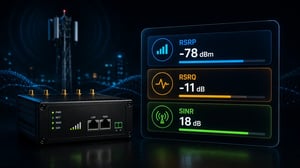
Open the status page of almost any industrial cellular router and you'll usually find three values sitting next to each other: RSRP, RSRQ, and SINR.
At first glance, they look like different ways of describing the same thing.
They aren't.
That's one reason cellular troubleshooting can be confusing. A router may report excellent signal strength while applications respond slowly. Another device with weaker signal may transfer data without any issues.
The difference often isn't coverage at all.
It's what the other radio measurements reveal.
Three Numbers That Tell Three Different Stories
When someone says a router has "good signal," they're usually referring to only one measurement.
The modem doesn't make decisions based on a single number.
It constantly evaluates several radio conditions because staying connected depends on more than simply hearing the nearest cell tower. Coverage matters, but so do interference, network conditions, and the quality of the radio environment. That's why RSRP, RSRQ, and SINR appear together in the router dashboard.
That's why experienced engineers rarely stop at signal strength alone.
A Strong RSRP Doesn't Always Mean a Healthy Connection
One of the easiest mistakes is assuming that a strong RSRP guarantees good connectivity.
Imagine a router showing -74 dBm. At first glance everything looks fine. Coverage is strong, the tower is clearly within reach, and signal bars are full.
Yet users complain that uploads are slow or devices keep retrying data sessions.
Nothing is wrong with RSRP.
It's simply answering a different question.
RSRP only tells you how well the router hears the serving cell. It says nothing about how busy that cell has become, how much interference exists around it, or whether the radio environment allows data to move efficiently.
Good RSRP gives the modem a solid starting point. It doesn't tell you how efficiently the rest of the connection is working. Without reasonable signal strength, the rest of the connection struggles. But a strong foundation alone doesn't guarantee good performance.
As a general guide:
| RSRP | Radio coverage |
|---|---|
| Better than -80 dBm | Excellent |
| -80 to -90 dBm | Good |
| -90 to -100 dBm | Fair |
| Below -100 dBm | Weak |
These ranges help estimate coverage, not application performance.
Reliable Connectivity Depends on More Than Signal Strength
Strong signal is only one part of the equation. POND IoT combines Multi-Carrier SIMs, intelligent routing, and resilient connectivity solutions to help devices stay connected even when network conditions change
The Signal Hasn't Changed. So Why Is the Connection Slower?
You check the router again and the RSRP reading looks almost identical to yesterday.
The connection doesn't.
Applications take longer to respond. Remote devices begin reporting data less frequently. File transfers slow down, even though the signal bars haven't moved.
It's easy to assume the problem is somewhere outside the cellular network because signal strength still looks healthy.
This is usually the point where attention shifts from RSRP to RSRQ.
Unlike RSRP, which reflects how strongly the router receives the serving cell, RSRQ reflects the condition of that radio connection. As the cell becomes busier or radio conditions become less efficient, RSRQ often starts changing before signal strength does.
That's why two routers can report almost identical RSRP values while behaving very differently.
As a general guide:
| RSRQ | Radio quality |
|---|---|
| -3 to -9 dB | Excellent |
| -9 to -12 dB | Good |
| -12 to -15 dB | Fair |
| Below -15 dB | Poor |
A lower RSRQ doesn't necessarily point to a fault. It simply tells you the radio environment isn't as clean or efficient as it was before.
Similar Signal. Different Speeds.
Now imagine two routers installed in different locations.
Both report an RSRP close to -80 dBm.
Both have similar RSRQ values.
One consistently delivers higher throughput than the other.
This is usually where SINR starts explaining what the other measurements can't.
The modem isn't only trying to receive the cellular signal. It also has to separate that signal from everything else sharing the radio spectrum. Nearby cells, reflected signals, electrical equipment, and other sources of interference all become part of the picture.
The cleaner that radio environment is, the easier it becomes for the modem to decode data correctly.
That's what SINR reflects.
Higher SINR values generally allow the network to use more efficient modulation and coding schemes, which usually results in better throughput. As SINR falls, retransmissions become more common, latency often increases, and overall performance begins to decline—even though signal strength may still look perfectly healthy.
Typical SINR ranges are:
| SINR | Radio environment |
|---|---|
| Above 20 dB | Excellent |
| 13-20 dB | Good |
| 0-13 dB | Fair |
| Below 0 dB | Poor |
Among the three measurements, SINR is often the one that best matches the speeds users actually experience.
Reading All Three Numbers Together
Looking at RSRP, RSRQ, or SINR on their own rarely tells the full story.
The useful information comes from seeing how they relate to one another.
A strong RSRP tells you the router can hear the serving cell.
A healthy RSRQ suggests the radio connection is operating under good conditions.
A high SINR indicates the modem can distinguish the wanted signal from surrounding interference without much difficulty.
When one of those measurements starts moving away from the others, it usually points you toward the next place to investigate.
Once you've looked at enough router dashboards, certain patterns begin to repeat.
| RSRP | RSRQ | SINR | What you'd probably see |
|---|---|---|---|
| Excellent | Excellent | Excellent | Fast, stable connectivity with clean radio conditions. |
| Excellent | Poor | Low | The tower is easy to reach, but interference or cell loading is reducing performance. |
| Fair | Good | High | Coverage isn't ideal, yet the connection may still perform better than expected. |
| Poor | Poor | Poor | The modem is already struggling at the radio level before applications begin exchanging data. |
Don't treat these combinations as pass-or-fail rules. They're simply patterns that appear regularly when troubleshooting cellular connections. The exact behaviour will always depend on the network, the location, and the hardware involved.
Not Sure What Your Router Is Telling You?
Cellular performance depends on more than a single signal reading. If you're evaluating connectivity for a new deployment or trying to understand how your network is performing, our team can help you choose the right connectivity approach for your environment.
So Which Number Should You Trust?
After seeing these three measurements for the first time, most people ask the same question.
"Which one actually matters?"
It would certainly make life easier if there were a simple answer.
Imagine opening a router dashboard and finding just one number labelled Signal Health. Green means everything is fine. Red means something needs attention.
That's not how cellular networks work.
Every modem reports RSRP, RSRQ and SINR because each one describes a different part of the radio connection. Ignore one of them and it's surprisingly easy to head in the wrong direction.
A router with excellent RSRP can still perform poorly because interference is overwhelming the receiver. Another router with only average signal strength may work flawlessly because the radio environment is much cleaner.
That's why experienced engineers rarely ask,
"What's the RSRP?"
More often the next question is,
"What do the other two numbers look like?"
A Router Dashboard Tells a Story
Imagine you're checking two remote sites after someone reports slow data uploads.
The first router looks promising.
| Metric | Reading |
|---|---|
| RSRP | -76 dBm |
| RSRQ | -14 dB |
| SINR | 2 dB |
At first glance, it's tempting to stop here. The signal strength is good, so the obvious assumption is that the problem must be somewhere else.
Then your eyes move to the next two readings.
Neither of them looks as healthy.
The modem has no trouble hearing the tower, but it's having a much harder time separating that signal from everything happening around it. That usually means slower throughput, more retransmissions and applications that feel less responsive than the signal bars would suggest.
Now compare that with another site.
| Metric | Reading |
|---|---|
| RSRP | -92 dBm |
| RSRQ | -8 dB |
| SINR | 21 dB |
The coverage is noticeably weaker.
Yet many engineers would rather work with this connection than the first one.
The modem isn't receiving the strongest signal, but the radio environment is much cleaner. That often gives the network a better opportunity to exchange data efficiently.
Looking only at RSRP, most people would choose the first router.
Looking at all three measurements together often leads to the opposite conclusion.
When the Numbers Point in Different Directions
One of the most useful things about these measurements is that they rarely fail in the same way.
If RSRP starts dropping while the other values remain healthy, the first place to investigate is usually coverage.
If RSRP stays stable but RSRQ begins falling, attention often shifts toward changing radio conditions or a busier serving cell.
When SINR suddenly drops, the radio environment itself deserves a closer look. Interference, reflections, nearby cells and other sources of noise all become possible contributors.
None of those observations provides the complete answer on its own.
They simply help narrow the search.
That's exactly what these measurements were designed to do.
Reading the Dashboard Is Only the Beginning
Router statistics don't fix connectivity problems.
They explain where to start looking.
Sometimes the solution is as simple as moving an antenna to a different part of the building. In other cases, changing the router's position by a meter or two is enough to improve the radio environment.
There are also situations where nothing at the site has changed at all. The network has simply become busier than it was earlier in the day.
And occasionally the best answer isn't moving hardware, it's moving to a different carrier whose network performs better in that location.
The important point is that different problems leave different fingerprints.
RSRP, RSRQ and SINR help you recognise those patterns long before anyone reaches for replacement equipment.
Can You Improve These Numbers?
Once you've identified which measurement looks suspicious, the next question is usually whether it can actually be improved.
Sometimes the answer is yes.
Sometimes the dashboard is simply describing conditions you can't control.
If RSRP is consistently weak, the first thing engineers usually examine isn't the router itself. They look at where it's installed. Moving the antenna away from metal objects, placing it higher, or mounting it outside can sometimes produce a noticeable improvement without replacing any equipment.
A different pattern often leads somewhere else.
Suppose RSRP remains healthy, but SINR stays low no matter how many times you refresh the dashboard. The router clearly hears the tower, so the challenge isn't coverage. The radio environment is simply crowded. Nearby cells, reflections from surrounding buildings, or other sources of interference may all be competing with the signal.
Changing antenna placement can sometimes help.
Sometimes it doesn't.
There are also situations where the local installation isn't the problem at all. The serving cell may simply become busier during certain hours of the day. In those cases, the dashboard is showing exactly what's happening on the network rather than revealing a fault with the equipment.
This is one reason large IoT deployments don't rely only on signal strength when choosing a carrier. They look at overall radio performance over time because the strongest network isn't always the one delivering the most reliable connectivity.
Planning a Reliable Cellular Deployment?
Every deployment is different. Coverage, carrier availability, hardware, and application requirements all influence connectivity. Tell us about your project, and we'll help you identify the solution that best fits your operational needs.
The Dashboard Is Telling You Where to Look
It's tempting to think of RSRP, RSRQ and SINR as three technical values that only network engineers need to understand.
In reality, they're much more useful than that.
Together, they help explain why two devices installed only a few kilometres apart can behave completely differently. They explain why moving an antenna by a small distance sometimes improves performance dramatically. They also explain why replacing perfectly good hardware occasionally changes nothing at all.
Perhaps the most important lesson is this:
No single number tells the whole story.
A strong RSRP doesn't guarantee fast data.
A healthy SINR can't compensate for weak coverage.
Good RSRQ doesn't automatically mean applications will perform perfectly.
The real value comes from reading the three measurements together and letting them guide the next step in troubleshooting.
Once you start looking at the dashboard that way, those three unfamiliar abbreviations become far more than radio statistics.
They become clues.
Frequently Asked Questions
It's easy to assume these three numbers measure the same thing because they always appear together on a router dashboard.
They don't.
RSRP tells you how strongly the router receives the serving cell. RSRQ reflects the quality of that radio connection, while SINR shows how much interference surrounds the useful signal. Looking at only one of these values rarely explains why a cellular connection performs well or poorly.
There's no single number that guarantees good connectivity.
As a general guide, an RSRP better than -80 dBm usually indicates excellent cellular coverage, while -80 to -90 dBm is considered good in many deployments. Just remember that RSRP only tells part of the story. A router can report an excellent RSRP and still perform poorly if RSRQ or SINR reveal problems elsewhere.
People often try to decide which number matters most.
That's usually the wrong question.
RSRP and SINR describe different parts of the same connection. One tells you how well the router hears the network. The other tells you how clearly it can separate that signal from surrounding interference. Looking at both values together is far more useful than choosing one over the other.
It happens more often than people expect.
A router may show excellent signal strength while uploads become slower, applications respond less reliably, or devices start retrying data sessions. Strong RSRP simply confirms that the router can hear the cellular tower well. It doesn't tell you whether interference, congestion, or changing radio conditions are affecting performance.
If one measurement answered every question, the other two wouldn't be there.
Router manufacturers display all three because each one helps explain a different part of the radio connection. Reading them together makes it much easier to understand whether you're dealing with weak coverage, changing radio conditions, or interference.
Sometimes they can.
If weak coverage is the issue, moving the router or repositioning an antenna may improve RSRP. If interference is limiting performance, improving SINR may require a different antenna location or even a different carrier. The first step isn't changing hardware—it's understanding which measurement is pointing you toward the problem.