

Table of Contents
- CGNAT at a Glance
- What Is CGNAT?
- Why Businesses Care About It
- Why Mobile Operators Use CGNAT
- How CGNAT Works
- Why Devices Can Send Data but Cannot Be Reached Remotely
- Common IoT Devices Affected by Shared Addressing
- Common Symptoms of Shared Addressing
- How to Check Whether Your SIM Uses Shared Addressing
- How Businesses Work Around Shared Addressing
- CGNAT vs Public IP
- Does 5G Eliminate CGNAT?
- Key Takeaways
- Frequently Asked Questions
CGNAT at a Glance
What Is CGNAT?
A surprisingly large number of connectivity investigations start the same way.
A technician logs into a router and confirms it is online. A payment terminal is processing transactions. A digital signage player is receiving updates. The device is clearly communicating with the outside world.
Then someone attempts to access it remotely.
Nothing happens.
At first glance, it looks like a firewall issue. Sometimes the device itself gets blamed. Teams check port forwarding rules, VPN settings, and access permissions. Hours can disappear before anyone looks at the addressing being used by the network.
In many cellular deployments, the device never receives its own publicly routable IPv4 address in the first place.
Instead, the mobile operator places large numbers of subscribers behind a shared address using a system known as Carrier-Grade Network Address Translation, or CGNAT.
The arrangement works well for normal internet traffic. Devices can send data, reach cloud platforms, and communicate with external services without difficulty. The limitations usually appear only when an outside system needs to initiate a connection back toward the device.
That distinction is what catches many deployments by surprise.
Why Businesses Care About It
Many deployments operate for years without anyone paying attention to how addresses are assigned inside the mobile network.
The reason is simple. Nothing appears to be broken.
Devices report status updates. Transactions reach backend systems. Cameras upload footage. Monitoring dashboards continue to populate with data.
The underlying network only becomes relevant when someone needs to reach the device from the outside.
A technician wants to log into a cellular router. An operations team needs access to a remote ATM. A digital signage player stops responding and requires troubleshooting. An engineer attempts to connect to industrial equipment located hundreds of miles away.
That is often the moment the limitation becomes visible.
If a deployment only sends data toward cloud platforms or internal systems, shared addressing may never attract attention. Once remote management enters the picture, however, the conversation changes. What seemed like a straightforward connectivity service suddenly becomes part of the network architecture discussion.
Why Mobile Operators Use CGNAT
The short version comes down to arithmetic. There are far more devices connecting to mobile networks than there are publicly available IPv4 addresses.
Every smartphone, payment terminal, industrial router, camera, tracking device, and sensor needs a way to communicate. Giving each connection its own public IPv4 address is no longer practical, so operators rely on address-sharing technologies to support growing numbers of subscribers.
The pressure comes from the sheer number of connected devices now operating on mobile networks.
A decade ago, most cellular connections belonged to smartphones. Today, operators also support payment terminals, industrial gateways, cameras, routers, digital signage players, tracking devices, charging stations, sensors, and countless other systems communicating over cellular infrastructure every day.
From the operator's perspective, the model works remarkably well. Devices can send telemetry, process transactions, reach cloud services, and exchange data with external platforms without users noticing anything unusual.
The limitations usually remain hidden until someone tries to establish a connection from outside the network back to the device.
How CGNAT Works
The difference becomes easier to understand when the traditional public IP model is compared with a shared-address model.
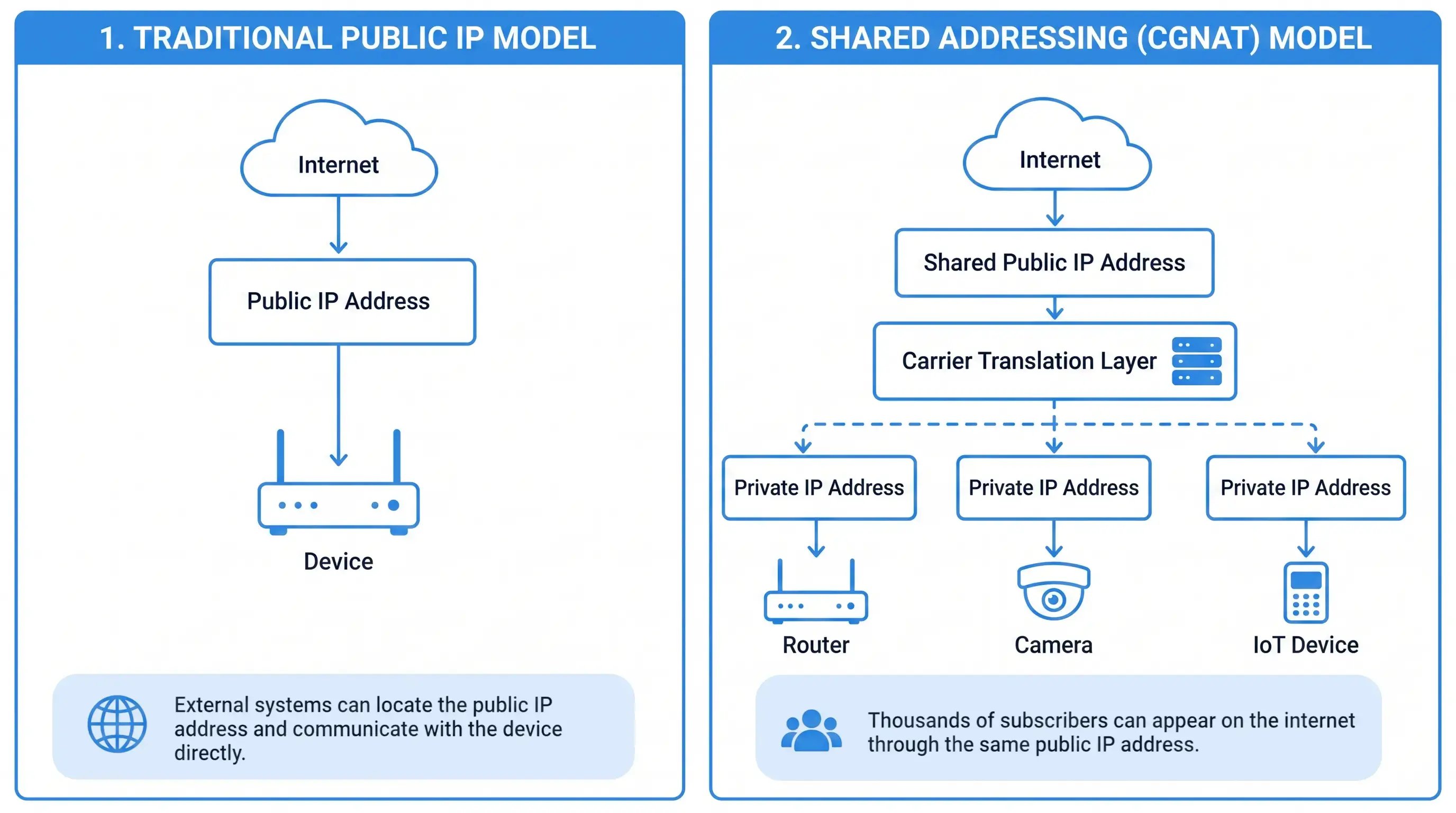
On the left, a public IP address belongs to a single device. If someone knows that address, they can attempt to connect directly to it from the internet.
On the right, multiple devices sit behind a carrier-managed translation layer and share the same public-facing address. From the outside, those devices no longer appear as individual endpoints.
Thousands of subscribers can access internet services through this arrangement without noticing any difference. Web browsing, cloud connectivity, payment processing, telemetry reporting, and many other applications continue to work normally.
The limitation appears when the connection starts from the opposite direction.
An external system may know the shared public address, but it cannot see the individual devices sitting behind it. Without additional routing information, the network has no reliable way to determine which subscriber should receive the incoming request.
That is why remote access, port forwarding, and other inbound services often become difficult in these environments.
Why Devices Can Send Data but Cannot Be Reached Remotely
This is usually the point where teams start questioning whether something is broken.
The device is reporting data. Transactions are reaching backend systems. Status updates continue to appear in monitoring dashboards. Nothing immediately suggests a connectivity problem.
Then someone tries to access the device remotely.
The connection fails.
That combination often creates confusion because both observations are true at the same time. The device can communicate with the outside world, yet the outside world cannot easily communicate back.
In practice, devices operating behind shared addressing can usually:
- Send telemetry
- Upload transaction data
- Report health and status information
- Connect to cloud services
- Receive responses to requests they initiated
The difficulties tend to appear when an external system attempts to establish a connection first.
Common examples include:
- SSH access
- Remote desktop sessions
- Direct camera access
- Port forwarding
- VPN server connections
The distinction comes down to who starts the conversation.
When the device initiates communication, the network already knows where the return traffic belongs. When an outside system initiates communication, that information may not exist.
That difference is what makes outbound connectivity appear normal while inbound connectivity becomes much harder.
Common IoT Devices Affected by Shared Addressing
The limitation is not tied to a particular industry. It can appear anywhere direct remote access is expected over a cellular connection.
The devices themselves are not the issue.
The common factor is the need for inbound connectivity. When a deployment depends on direct remote access, shared addressing can become part of the design conversation.
Common Symptoms of Shared Addressing
The signs are often indirect. In many cases, the device remains connected, continues exchanging data, and appears healthy in monitoring systems.
The clues usually emerge when remote access, troubleshooting, or inbound connectivity becomes part of the workflow.
Any one of these symptoms can have other causes.
When several start appearing at the same time, the way the SIM is addressed becomes worth investigating.
How to Check Whether Your SIM Uses Shared Addressing
There is no single test that confirms it immediately. In practice, most teams piece the answer together from several clues.
The checks below can usually provide a reliable indication of how the connection is being handled.
No single result should be treated as proof on its own.
When several of these checks point in the same direction, the underlying addressing model becomes much easier to identify.
How Businesses Work Around Shared Addressing
Organizations generally solve the problem in one of four ways.
Each approach solves the same challenge from a different angle.
Some deployments rely on Static Public IPs to make devices directly reachable from the internet. Others route traffic through Private APNs, establish VPN tunnels, or keep devices behind cloud-based management platforms.
CGNAT vs Public IP
The difference becomes most visible when remote access is required. The table below summarizes how a shared-address environment compares with a publicly reachable IP address.
Both approaches remain common in cellular deployments. The deciding factor is usually whether devices need to accept connections from outside the network. Understanding how a Public IP address differs from private addressing can make that decision much easier.
Does 5G Eliminate CGNAT?
The assumption is understandable. A newer generation of mobile technology arrives, networks become faster, and many people expect older limitations to disappear with it.
That is not what happened here.
Shared addressing was never a 4G problem. It emerged because the number of connected devices grew much faster than the pool of available IPv4 addresses.
For that reason, it remains common on both 4G and 5G networks today.
Over time, broader IPv6 adoption may reduce the industry's reliance on address sharing. For now, however, it remains a familiar part of many cellular deployments.