
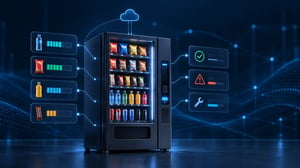
Vending machine telemetry gives operators remote access to sales records, inventory estimates, and equipment information. Instead of waiting for the next visit to find out what a machine needs, they can use those records to plan replenishment and maintenance. Cellular connectivity is one way to keep that information flowing between machines and management systems.
Table of Contents
- What Data Can Vending Machine Telemetry Collect?
- How Vending Machines Send Data to Management Systems
- Using Sales Data to Improve Inventory Decisions
- Planning Restocking Routes Around Actual Demand
- Identifying Machine Problems Before the Next Service Visit
- Prioritizing Service Visits Using Telemetry Data
- What Happens When a Vending Machine Stops Reporting Data?
- Why Cellular Connectivity Matters for Vending Telemetry
- Managing Telemetry Across a Growing Vending Fleet
- Making Telemetry Part of Daily Vending Operations
1. What Data Can Vending Machine Telemetry Collect?
A vending machine may run out of its best-selling drinks long before the next scheduled restocking visit. Other products are still available, and the machine continues accepting payments. Without remote inventory information, the operator may have no reason to check that location ahead of schedule.
For a business managing machines across several locations, finding these problems during routine visits can mean days of missed sales. Telemetry gives operators a way to see what has been happening at a machine without sending someone to inspect it.
The information available depends on the machine and its monitoring equipment. Most systems begin with sales records, but some also provide inventory estimates, payment activity, and equipment alerts. An operator might see that a particular drink is selling faster than expected, that a dispenser has recorded repeated errors, or that a machine has stopped sending reports.
Inventory figures need some interpretation. In many systems, remaining stock is calculated from the quantities loaded into the machine and the sales recorded afterward. If a driver loads 15 items but enters 20 in the management system, the reported inventory will be wrong even when every sale is recorded correctly.
There are similar differences in equipment monitoring. A newer machine might report refrigeration faults or problems with individual components, while an older model may provide little more than sales totals. The remote dashboard can only display information that the equipment is capable of supplying.
2. How Vending Machines Send Data to Management Systems
A driver checking a vending machine in person can read its sales records, inspect the shelves, and look for equipment problems. Remote monitoring depends on getting at least some of that information out of the machine and into a system the operator can access elsewhere.
Many vending machines store sales and audit information in their controllers. A telemetry device or built-in communication module retrieves the available records and sends them to a management platform. How much information it can collect depends partly on the machine's interfaces.
This is where two common vending terms come into the picture: DEX and MDB.
DEX is used to retrieve audit records such as sales and cash activity. MDB handles communication between the vending machine controller and peripheral equipment, including coin mechanisms, bill validators, and cashless payment readers. They serve different purposes, and neither should be confused with the network connection that sends telemetry to a remote platform.
That connection may use the building's Wi-Fi or wired internet, although many vending installations use cellular service. A machine with a cellular communication module can report information without needing access to the location's local network.
The reporting schedule is another detail operators need to understand. Some systems collect audit records at intervals, while others can send individual transactions or equipment alerts more frequently through supported interfaces. If inventory figures are updated only a few times a day, the dashboard may not reflect sales made since the last report.
For routine replenishment planning, that delay may be manageable. For a machine reporting a serious equipment problem, the timing of an alert can matter much more.
CONNECTIVITY SOLUTION
Are your vending machines losing telemetry data or reporting inconsistently?
3. Using Sales Data to Improve Inventory Decisions
Product demand can vary considerably between vending locations, even when the machines carry much the same selection. An office machine might sell most of its snacks during the working week, while a machine at a transport hub can go through its popular drinks much faster.
Operators have always been able to spot these differences by checking what is left during restocking. The difficulty is knowing what happens between visits. A driver might arrive to find that bottled water has sold out, but there's no way to tell from the empty selection alone whether it ran out that morning or three days earlier.
With remote sales records, operators can follow those patterns more closely and adjust what they load. Sometimes the answer is simply to increase the quantity of a popular product. In other cases, it makes more sense to give that product an additional selection and reduce space for something that rarely sells.
These adjustments also affect par levels, the target quantities maintained for individual products. A machine near a school, for instance, might need different stock levels during term time and holidays. The right quantities depend on the location rather than a standard plan applied to every machine.
Of course, the records need to match the products inside. If a driver replaces one snack with another but leaves the old product assignment in the system, the sales figures will be attributed incorrectly. The machine may be reporting every transaction, yet the inventory numbers no longer reflect what's on the shelves.
4. Planning Restocking Routes Around Actual Demand
A fixed route is easy to organize. The driver knows which machines to visit, and the warehouse knows what stock needs to go out. But a visit that made sense when the route was established may become unnecessary as demand changes.
This is especially noticeable in fleets with a mix of busy and quiet locations. Some machines need replenishment several times a week; others may have enough stock to last much longer. Visiting both on the same schedule means the driver may spend part of the day servicing machines that aren't close to running low.
Inventory reports give route managers a better basis for deciding where to go. They can bring forward visits to machines approaching their stock limits and, where practical, postpone others. It may also be possible to combine stops that would otherwise fall on different days.
The information is useful back at the warehouse, too. With pre-kitting, products are prepared for each machine before the route begins. Drivers don't need to carry large amounts of extra stock and sort everything at the location. They take what the records indicate they'll need.
In practice, the route still has to accommodate building access, travel distances, cleaning, and product rotation. A hospital may allow vending service only during certain hours, regardless of how much stock is left. Demand is one part of the schedule, not the only consideration.
RELATED GUIDE
A vending machine can appear connected even when its telemetry isn't reaching the management platform. Our guide explains where communication can break down.
5. Identifying Machine Problems Before the Next Service Visit
A customer tries to buy a snack, the payment goes through, but the product doesn't drop. If nobody reports the problem, the operator may not find out until the next visit.
Depending on the machine, a dispensing error like this may be recorded and sent to the monitoring platform. The service team can see that something has gone wrong at a particular location, sometimes with enough detail to identify which selection is affected.
That changes what happens before the technician leaves. A report of repeated dispensing errors suggests a different set of checks than a payment reader that has stopped communicating. The technician may need different tools or replacement parts, and in some cases the issue can be investigated remotely before anyone is dispatched.
There's also a practical difference between sending a driver to replenish stock and sending someone equipped to repair a machine. If the problem is mechanical, another delivery won't resolve it.
Not every fault produces a useful alert. Some machines report general error codes, and older equipment may offer little diagnostic information. A technician still has to inspect the machine when the cause isn't clear. But when an alert contains useful detail, the visit can begin with a better idea of what needs attention.
6. Prioritizing Service Visits Using Telemetry Data
Not every vending machine alert needs a technician on-site the same day. A low-stock warning can often wait until the next delivery, while a payment failure may need attention much sooner.
Temperature alarms are another matter. If a refrigerated machine reports temperatures outside its acceptable range, the operator needs to check what has happened and whether the products are still safe to sell. That may take priority over other service work, even at a location with relatively low sales.
When several alerts arrive together, the operator has to consider more than the number of notifications. A machine that repeatedly reports the same dispensing error may have one unresolved fault, not several separate problems. And a busy location where customers can no longer pay could be losing more sales than a quieter machine with a less urgent issue.
The service schedule also depends on who's available and what they can do. A driver already visiting a location may be able to replenish an empty selection, but there's little point sending that person to investigate a faulty payment reader without the necessary equipment.
Telemetry provides the information for making those decisions. The priorities still depend on the nature of the problem, the location, and the resources available that day.
CONNECTIVITY SOLUTION
Does cellular coverage vary across your vending locations?
7. What Happens When a Vending Machine Stops Reporting Data?
A vending machine can lose its telemetry connection and continue selling products. Unless the management platform flags the missing updates, the operator may not notice anything unusual.
The problem often becomes apparent when someone relies on outdated inventory figures.
If a machine last reported 30 bottles of water on Monday and then stopped communicating, that number could still be on the dashboard two days later. Customers may have bought most of those drinks in the meantime. A driver preparing the next delivery would be working from figures that no longer reflect what's in the machine.
Some telemetry devices keep records locally and upload them after the connection returns. That can restore the sales history, but the information may arrive too late to prevent an empty selection or an unnecessary service visit.
Fault reports can be delayed as well. A machine may record a dispensing problem while the operator remains unaware of it.
It's also possible for payment and telemetry connections to behave differently. Cashless transactions may continue if the payment reader has its own working connection, even when the telemetry device is offline. The reverse can happen too: machine reports may still arrive while customers have trouble paying.
A missing telemetry report therefore needs investigating, but it shouldn't automatically be treated as a complete machine outage. The latest reporting time is often the first useful thing to check.
8. Why Cellular Connectivity Matters for Vending Telemetry
Getting a vending machine connected can be straightforward at one location and surprisingly difficult at another. An office might have a network the operator is allowed to use, while a hospital or shopping center may have restrictions on connecting third-party equipment.
Cellular service gives the operator a way to manage the connection without relying on the building's IT arrangements. That can be particularly useful when machines are going into properties owned by different customers.
Coverage still needs checking at each machine. A modem may connect without difficulty near a building entrance but struggle in a basement or interior corridor. Even a small change in antenna placement can sometimes make a difference, although there are locations where the signal simply isn't good enough.
Operators working across several sites may also find that the same carrier doesn't perform equally well everywhere. A Multi-Carrier SIM offers access to multiple supported networks, depending on the service and device configuration. It gives the equipment more network options, but switching between them isn't necessarily immediate, and coverage problems can still occur.
The type of telemetry being sent matters, too. A system uploading sales information every few hours can often tolerate a brief interruption. A temperature alarm is more time-sensitive, particularly when refrigerated products are involved.
During installation, checking the modem's connection status is only part of the job. The more useful test is whether the machine's reports are arriving at the management platform from the position where the equipment will remain.
9. Managing Telemetry Across a Growing Vending Fleet
A vending operator may start with a group of similar machines and gradually add equipment from different manufacturers. Some machines are new, others have been in service for years, and not all of them provide the same information.
This becomes noticeable when the operator tries to compare locations through one dashboard. A newer machine might report dispensing faults and individual transactions, while an older one only sends periodic sales records. If no faults appear for the older machine, that doesn't necessarily mean everything is working. It may simply have no way to report them.
The same problem comes up with inventory. One machine might have sent its latest sales figures an hour ago, while another hasn't reported since the previous evening. Both may appear in the same stock report, even though the information isn't equally current.
Keeping machine records organized takes work, too. Equipment gets moved, telemetry devices are replaced, and product selections change. When someone forgets to update the management system, a sales report may show activity at the wrong location or under an outdated machine record.
Cellular connections bring their own day-to-day tasks. New SIMs have to be activated, data usage needs checking, and machines that stop communicating need attention. Managing these connections centrally can reduce the amount of work involved, especially when the fleet uses more than one cellular network.
But a working cellular connection doesn't always mean the telemetry is working. A modem may be registered on the network while the machine's reports fail to reach the vending platform. When that happens, the operator needs to look beyond the SIM or carrier to find where communication has stopped.
10. Making Telemetry Part of Daily Vending Operations
For a route manager, the useful part of telemetry is knowing what needs to go on tomorrow's delivery truck. For a service technician, it may be finding out about a faulty dispenser before arriving at the machine.
Neither job becomes easier if the records are out of date or the information doesn't match what's inside the equipment. Drivers still need to record what they load, and someone needs to notice when a machine has stopped reporting.
The value comes from having enough reliable information to plan the next visit instead of using that visit to discover what needs doing.
CONTINUE EXPLORING